“AF08”: SOFTWARE FOR 3590E INDICATORS FOR WHEEL WEIGHING SYSTEMS WITH VARIOUS PADS
Suitable for creating wheel weighing and static axle weighing systems, or to weigh objects with various resting points. Ideal for weighing and calculating the centre of gravity coordinates of the vehicles, trucks, airplanes, containers, etc. Simultaneous display of the weight of each connected pad and of the sum. CE-M approved (OIML R-76 / EN 45501).
FUNCTIONS
Clearing cycle of all the connected pads.
Wheel weighing multi scale functioning mode, with up to 16 connectable 350-Ohm load cells and up to 4 independent reading channels available (for 4 pads).
Static axle weighing functioning mode, up to 2 reading channels, with manual acquisition of the weight of each axle through dedicated key.
Calculation of the x and y coordinates of the centre of gravity (for wheel weighing mode).
Cancellation of the last weigh made.
Quick selection of the number of active reading channels of the weight (up to 4, independent), for configuring the instrument depending on the number of resting points of the vehicle to be weighed.
3 zeroable total levels and printable in an independent way: – vehicle total – vehicles’ total – grand total.
Semi-automatic tare (for wheel weighing mode).
Presettable tare, subtracted from the sum weight of the single wheels in the wheel-weighing mode or from the total weight of the vehicle in the axle-weighing mode.
Selection of displayed data on the graphic LCD display (totals, progressives, weight…).
Simultaneous display of the weight on each pad (up to 4 independent channels) and of the total weight.
With the touch screen indicator model 3590ETKR2G4, it is possible to visualize simultaneously the weight of 8 wheels (8 WWSxx2G4 platforms), with archives management and calculation of the center of gravity, or the weight of 8 axles (8 couples of WWSxx2G4 platforms).
Completely configurable keyboard functions according to the customers’ needs.
15 configurable and printable text ID`s containing 32 characters, for example: Code, lot ID, operator ID, shift number, etc.
Database of 1000 storages, with programmable modification password, each composed of 5 alphanumeric descriptions, for vehicle, client, or material management.
Programmable printout from keyboard or from PC (through the free Dinitools.net software) of 30 print formats linkable to various functions; each print format may contain up to 2048 positions which may be ASCII codes or preconfigured print blocks (i.e. Company name, weight of each pad or axle, total weight, centre of gravity coordinates, etc.).
Alibi memory for automatic storage of the total weight of the vehicle (only for wheel-weighing mode).
Print and display list of last 3500 vehicles (in wheel weighing mode) or 3500 axles (in axle weighing mode), with possibility of cancellation.
APPROVAL WITH CE-M SERIES PAD
The weight of the single pad is legal for trade.
The total weight of the vehicle is legal for trade depending on the application: – The wheel weighing systems, with a number of pads equal to the number of vehicle’s wheels, are approved, because the weight of the vehicle is determined in only one weigh. – The axle weighing systems are for internal use only.
“DINITOOLS”: SOFTWARE FOR QUICK CONFIGURATION OF THE INSTRUMENT
Thanks to Dinitools, the programming of the set-up and of the databases as well as the customisation of the printouts according to the customer specifications will be quicker and easier.
Dinitools also simplifies the creation of new weighing systems and allows to quickly restore the original configuration.
“AF09”: SOFTWARE FOR 3590E/CPWE INDICATORS FOR AXLE WEIGHING
Software suitable for advanced applications of axle weighing and totalization for control of the weight of the vehicle or for input / output weighing.
MAIN FUNCTIONS
Clearing.
Preconfigurable Tare.
Totalisation functions: – Manual axle weighing and totalization. – Automatic static axle weighing and totalization. – Automatic dynamic axle weighing and totalization.
Two available functioning modes: – Checking the weight of the vehicle with printing of the axle and overall total weighs. – Axle totalisation with input/output function.
Input/output weighs’ storage through ID CODE or VEHICLE PLATE (up to 999 suspended weighs).
Fully configurable keyboard functions according to customer requirements.
15 configurable and printable ID texts containing each 32 characters (example: Code, Lot ID, operator ID, shift number, etc.).
Database of 500 customers, each with three 25-character alphanumeric descriptions.
Database of 500 articles, each with two 20-character alphanumeric descriptions.
Database of 500 vehicles, each with a 10-character value of the plate, a 20-character alphanumeric description, and a linked tare.
6 levels of re-settable and independently printable totals: partial total, general total, grand total, customer total, article total and vehicle total.
Fully programmable printout from the keypad or PC (using the free Dinitools software), with the weight of each axle as well as the total weight of the vehicle. 30 print formats can be combined with various functions (PRINT-key , totalisation, customer total, article total and vehicle total, Partial total, General total, Grand total …); each print format may contain up to 2048 positions which may be ASCII codes or preconfigured print blocks (i.e. Company name, lot and weigh progressive numbers, gross weight, tare, net, etc.).
“DINITOOLS”: SOFTWARE FOR QUICK CONFIGURATION OF THE INSTRUMENT
Thanks to Dinitools, the programming of the set-up and of the databases as well as the customisation of the printouts according to the customer specifications will be quicker and easier.
Dinitools also simplifies the creation of new weighing systems and allows to quickly restore the original configuration.
“E-BATCH”: SOFTWARE FOR 3590E/CPWE INDICATORS FOR MULTICOMPONENT DOSAGE SYSTEMS
3590EXT and CPWE weight indicators software version for automatic multicomponent and multi scale dosage systems. Database of 100 different activities and 500 formulas. Direct management of 12 different components through the relay. Completely programmable printouts.
DOSAGE FUNCTIONS
Management of the dosage on various scales (up to 4 independent), with automatic scale change during the dosage.
Check of the tare presence at dosage start with tare values programmable for each recipe.
Automatic recalculation of the formula targets, by entering the total weight to be dosed.
Automatic printing of the dosage data.
Storage and printing of the consumptions. Quick recall of the printouts from keyboard.
Automatic correction of the flight weight.
Programmable number of repetitions of the dosage cycle; function of continuous cycle.
Tolerance test on the dosed weight, with guided correction through simple messages on the display.
Control of the maximum dosage time.
Alarm management on the display.
Completely programmable printouts, for compatibility with any ASCII printer manageable through the serial port.
DATABASES
Database of 100 products/activities, which may be selected from the following. – Automatic dosage in loading. – Manual dosage in loading, with possibility of managing the control light. – Complete or partial unloading. – Fractioned unloading, for dividing all the dosed material in equal quantities. – Timer, to activate the mixers, burners, or stirrers for a preestablished time. – Pause, to allow the manual operations of the user. – Manual weight, to add the pre-weighed quantities to the dosage.
Database of 500 formulas; each formula contains 20 products/activities.
Programming of the activities and the recipes in manual mode or through software on PC (Dinitools).
“E-BATCH1”: SOFTWARE FOR 3590E/CPWE INDICATORS FOR SINGLE PRODUCT DOSAGE SYSTEMS
Software for 3590EXT and CPWE weight indicators, to create single product dosage systems in loading (useful for filling hoppers, silos or big bags, or guiding the operator in the manual dosages) and in unloading (useful for dividing the quantity of materials of equal weight or extract precise quantities from the silo, with management of the reloading). Database of 500 formulas.
DOSAGE FUNCTIONS
Selectable dosage mode between unloading, automatic or guided manual loading.
Management of the dosage on various scales (up to 4 independent).
Management of the production program for dosage up to 4 formulas in sequence, with automatic selection of the following formula and automatic change of the scale.
Management of the volume flow meter, for dosing in litres.
Checking of the tare presence at the dosage start; the tare values are programmable for each formula.
Automatic printing of the dosage data.
Storage and printing of the consumptions. Printouts may be quickly recalled from the keyboard.
Automatic correction of the flight weight.
Repetitions of the programmable dosage cycles; infinite cycle function.
Tolerance test on the dosed weight, with guided correction on display.
Check of the maximum dosage time.
Alarms indication on display.
Completely programmable printouts, for compatibility with any ASCII printer manageable through the serial port.
DATABASES
Database of 500 formulas with target, speed change threshold, flight, +/- tolerance, minimum tare and maximum tare values, 2 setpoint values in weight for activation of 2 output.
Manual programming of the activities and the formulas or throught PC software (Dinitools).
“E-BELT”: SOFTWARE FOR 3590E/CPWE INDICATORS FOR MANAGEMENT OF CONTINUOUS DOSAGES ON BELT
Software version for the measurement/integration of the weight, flow of material transitioning on the weighing belt, with memorisation of the quantity of dosed material; possibility of adjusting the flow through the 16 bit analogue output and PID control. Possibility of remote management of the instrument, through Sysway or Modbus RTU protocols, or Profibus through external optional interface.
DOSAGE FUNCTIONS
2 selectable operation modes: – Instantaneous reading of the flow, in kg/h or t/h with displaying of the status of the system and of the dosed total. – Adjustment of the dosage hourly flow, in function of the pre-setted target, with PID algorithm.
Visualisation of the hourly flow graph and wide range of data displayed on the display.
Calibration of the flow reading function, for controlling the dosage performances.
Reading filter of the hourly flow with configurable incidence and speed depending on the system.
Programmable dosage target upon weight or upon time, with relative contact.
Programmable start dosage delay, for synchronisation of various E-BELT systems in the dosage of material mixtures.
Management of the slow flow with programmable activation threshold, for more precise dosages.
Management of the dosage total under way and general total of dosages, printable and clearable independently from each other.
Management of the automatic dosage from remote master or through Profibus DP or Modbus RTU protocol.
Printing of the dosage data and the total.
Completely programmable printouts, for compatibility with any ASCII printer manageable through the serial port.
DATABASES
Database of 100 products with: 5 alphanumeric description, hourly flow target, weight dosage target and initial value analogue output.
Manual programming of the products or throught PC software (Dinitools).
KEYBOARD FUNCTIONS
START / RESTART dosage, PAUSE / RESET cycle and emptying of the belt out of the cycle.
Quick switch of the hourly flow target and of the dosage target.
Quick introduction and selection of the dosage data.
I/O FUNCTIONS
Activation cycle, START / RESTART dosage, PAUSE / RESET cycle and unloading of the belt out of the cycle, through external inputs.
Impulse counter of the accumulated quantity through relay contact, for direct communication with PLC or external devices.
Relay contacts dedicated for the complete management of the alarms and the blocks for off weight, off flow and belt side-slipping.
Input and output with programmable functions.
16 bit analogue input (optional) for programming the hourly flow target.
16 bit analogue output (optional) proportional to the hourly flow (lector mode) or programamble for regulating the dosage speed (regulator mode).
Serial communication protocol for programming the products and reading the cycle status.
SYSWAY and MODBUS communication protocol for programming the dosage data and managing the cycle.
External Profibus interface (optional), for programming the dosage data and managing the cycle.
Optional Bluetooth connection, for quick wireless programming of the product, through PC or PDA.
SYSWAY, MODBUS, PROFIBUS FUNCTIONS
READING THE DATA: – net weight – instantaneous flow – value of the instantaneous pid – partial total – general total – status of the optoisolated inputs – status of the optoisolated outputs – flow target (for the controller modes) – minimum flow, maximum flow – dosage time – target to be dosed – set point enabling/disabling value – status of the scale
AVAILABLE COMMANDS: – dosage Start/Stop/Reset – programming of flow target, target to be dosed and dosage time – print format – reset of accumulated totals – setpoint programming
“E-CHECK”: SOFTWARE FOR CPWE INDICATORS FOR TOLERANCE CONTROL SYSTEMS
Software version for managing systems that weight packages on a conveyor belt, through static or dynamic weighing and tolerance control. Thanks to the high conversion and acquisition performances and to the advanced filtering functions, it’s possible to weigh and memorize an elevated number of packs/min.
WEIGHING FUNCTIONS
Weighing acquisition modes: – Static or dynamic weighing, with management of pack detection photo cell. – Dynamic weighing with two START/STOP photo cells. – Static or dynamic weighing without photo cell (for Pick and Place lines).
Tolerance check: – by target, through articles database, with setting of 3 tolerance thresholds, for the physical division of the packs into 7 different groups. – by programmable weight thresholds (min/max), with articles dabatase. – by weight thresholds (min/max), through a quickly entry.
Calculation and printing of the statistics and of the standard deviation of the executed weighs.
Static or dynamic autozero function of the belt (up to 2% of the flow) after a programmable number of weighs.
Advnaced management of bar codes, with the possibility of storing, processing, and printing 5 different codes.
Automatic printing/clearing of the partial total after a programmable number of weighs.
Printing with each executed weigh and eventual automatic storage into the alibi memory.
Completely programmable printouts, for compatibility with any ASCII printer manageable through the serial port.
DATABASES
Database of 1000 articles with alphanumeric description, target and programmable tolerance thresholds.
Setting the density coefficient, for every article, for weighing in ml.
Programmable preset tare and activation delay of the expeller for each article.
Management of belt speed through analogue output, with programmable value for articles.
Programming of the article in manual mode or through software on PC (Dinitools).
Article selection through reading of bar code.
I/O FUNCTIONS
Cycle activation, RESTART / RESET cycle and START / STOP weigh through external inputs.
Management, through a cadence photo cell, of the cadence belt, for optimising the number of packs per minute weighed by the instrument.
Management of the automatic expulsion or stopping of the belts for manual expulsion or weight correction.
Programmable alarm activation time and tolerance indication; possibility of connection to control light.
Activation of the line second speed through an external input, with automatic recalculation of the weighing time (only for weighing with two photo cells).
Analogue output (optional) proportional to the weight or controlling the belt speed, with programmable values for each articles.
Serial communication protocol for programming the articles and managing the cycle.
External Profibus interface (optional), for programming the formulas and managing the cycle.
Optional Bluetooth connection, for quick wireless programming of the activities and the formulas, through PC or PDA.
PROFIBUS MAIN FUNCTIONS
Complete configuration of the article, of the automation time periods and of the setup parameters of the instrument.
Reading of the belt and inputs status, net weight, last executed weigh and number of weighs.
E-CHECKTOOL: Programming of the indicator
Programme on PC for optimising the weighing cycle; it’s possible to monitor the status of the inputs and outputs of the instrument, transmit serial commands for managing the automation, quickly modify the parameters of the instrument, graphically view and process the weighs in order to obtain the best weighing results.
“CHECKTOOL” and “E-CHECKTOOL ENTERPRISE”: SOFTWARE TO OPTIMISE THE WEIGHING RESULTS
Programming software which allows to optimise the weighing results.
DESCRIPTION
CHECKTOOL and E-CHECKTOOL ENTERPRISE are programmes which allow to quicken the configuration for static or dynamic weighing on belt; advanced calculation functions allow the processing of the weighs made during the testing of the system, in order to improve the precision and repeatability of the scale.
CHECKTOOL and E-CHECKTOOL ENTERPRISE are particularly suitables for quickly finding the best configuration of dynamic systems with a high number of packs per minute, or in systems in which the space for weighing is very small.
Furthermore, all the configurations can be memorised in order to be quickly loaded on the instruments.
MAIN FUNCTIONS
Automatic calculation of the positioning, weighing, and cadence times, through the entry of the data into the system.
Automatic optimisation of the weighing calculation parameters
Graphic report of the weighs, with indication of the calculated weight, of the weighing time and of the number of points used for the acquisition.
Visualisation of the best points for calculating the weigh
Graphic selection of the weighing area
Storage of the configurations and of the weighs.
Processing of the stored weighs, for calculation of filter parameters
Verification of the correct functioning of the automation relays.
Control of the tolerance relays (for the checkweigher).
Reading of the status of the instrument inputs.
Simulation of the photo cells and of the consensus.
Configuration which allows the dosage of various products, in loading or unloading, as well as mixing and formulation, with the possibility of managing mixers, burners or vibrators using dedicated contacts.
DATABASES
Database of 16 selectable products/phases which may be: – Automatic dosage; – Manual dosage, with possibility of managing a control light; – Complete or partial unloading; – Fractioned unloading, for dividing all the dosed material in equal quantities; – Timer, for enabling mixers, burners, or stirrers for a preestablished time period; – Pause, for allowing the manual operations of the operator; – Manual weight, for adding pre-weighed quantities to the dosage.
Database of 15 formulas, each one can contain: – up to 8 products/phases with target, speed change threshold, flight, +/- tolerance; – minimum tare and maximum tare values.
Formula selection through 2 external inputs (only for models with 4 inputs).
Dual dosage speed (approximate and fine), through any available contacts or analogue output (in the “AN” models).
One may assign to each product/phase a direct contact, for “fine” dosage, or a binary combination of contacts to codify up to 15 products/phases (only for models with 6 outputs).
“Fine” dosage contact active either constantly or intermittently (jogging).
Indication of weight within tolerance, out of tolerance, finished dosage, or alarm through any dedicated contacts
Analogue output (only for “AN” models) proportional to the weight or to the dosage speed.
DOSAGE FUNCTIONS
Checking the presence of the tare at the dosage start.
Automatic printing of the dosage data.
Storage and printing of the consumptions. Printouts may be quickly recalled from the keyboard.
Automatic correction of the flight weight.
Repetitions of the programmable dosage cycles; infinite cycle function.
Tolerance test on the dosed weight, with guided correction on display.
Check of the maximum dosage time.
Alarms indication on display.
BASIC FUNCTIONING OF THE MULTICOMPONENT DOSAGE
Once the dosage start command has been received, the following takes place: – the presence of the tare and weight stability is verified, – the execution of the automatic tare and the enabling of the automation through the dedicated outputs: the instrument executes the first phase of the formula;
Once the first phase is finished, the instrument automatically passes to the following phase, executing the automatic tare;
At the end of the last configured phase, the instrument enables the fine cycle contact and waits for the start of the new dosage, or automatically restarts with the following cycle.
Configuration which allows to manage a dosage system in loading of a single product, useful for filling hoppers, silos or big bags, or guiding the operator in the manual dosages.
DATABASES
Database of 40 formulas with target, speed change threshold, flight, +/- tolerance and minimum tare and maximum tare values.
Formula selection through 2 external inputs (only for models with 4 inputs).
Dual dosage speed (approximate and fine), through any available contacts or analogue output (in the “AN” models).
“Fine” dosage contact active either constantly or intermittently (jogging).
Automatic management of the download through any dedicated contacts.
Indication of weight within tolerance, out of tolerance, finished dosage, or alarm through any dedicated contacts.
Analogue output (only for “AN” models) proportional to the weight or to the dosage speed.
DOSAGE FUNCTIONS
Selectable dosage mode between automatic or guided manual.
Checking of the tare presence at the dosage start; the tare values are programmable for each formula.
Automatic printing of the dosage data.
Storage and printing of the consumptions. Printouts may be quickly recalled from the keyboard.
Automatic correction of the flight weight.
Repetitions of the programmable dosage cycles; infinite cycle function.
Tolerance test on the dosed weight, with guided correction on display.
Check of the maximum dosage time.
Alarms indication on display.
FUNCTIONING OF THE GUIDED MANUAL DOSAGE
NOTE: it is advisable to use a three-light control box (available upon price estimate) in order to ease the dosage operations, in which the yellow light indicates insufficient weight, the green light indicates the target weight, and the red light indicates too much weight.
1. Once the dosage start command has been received, the following takes place: – the presence of the tare and weight stability is verified, – the execution of the automatic tare and the yellow light turns on (*), in other words, the request of material is made.
2. When the weight is again within the lower tolerance level, both the yellow and green lights turn on (*).
3. When the weight is equal to the configured target, the yellow light turns off and the green light remains on.
4. If the weight is within the upper tolerance level, both the green and red lights turn on (*).
5. If the weight is over the upper tolerance level, only the red light remains turned on.
6. When the weight is again within the set tolerance levels, the operator gives a start impulse in order to continue with the complete unloading of the scale.
FUNCTIONING OF THE AUTOMATIC DOSAGE
1. Once the dosage start command is received, the following takes place: – the presence of the tare and weight stability is verified – the execution of the automatic tare and the enabling of the automation through its dedicated outputs: the dosages start at maximum speed.
2. Once the speed change threshold is reached, the dosage is slown down through the dedicated output.
3. When the TARGET is reached and the configured flight weight is missing, the slow dosage output is disabled and then it waits (for the configured time) for the dropping of the material.
4. Tolerance test on the dosed weight.
5. Storage of the formula consumptions and increment of the dosed general total.
6. Complete unloading request, through enabling of dedicated output.
7. End dosage or automatic restart for following cycle.
Configuration which allows to manage a dosage system in unloading of a single product, useful for dividing the quantity of materials of equal weight or extract precise quantities from the silo, with management of the reloading.
DATABASES
Database of 40 formulas with target, speed change threshold, flight, +/- tolerance.
Formula selection through 2 external inputs (only for models with 4 inputs).
Dual dosage speed (approximate and fine), through any available contacts or analogue output (in the “AN” models).
“Fine” dosage contact active either constantly or intermittently (jogging).
Automatic management of the reloading of the silo using a dedicated contact.
Indication of weight within tolerance, out of tolerance, finished dosage, or alarm through any dedicated contacts.
Analogue output (only for “AN” models) proportional to the weight or to the dosage speed.
DOSAGE FUNCTIONS
Automatic dosage in unloading.
Automatic printing of the dosage data.
Storage and printing of the consumptions. Printouts may be quickly recalled from the keyboard.
Automatic correction of the flight weight.
Repetitions of the programmable dosage cycles; infinite cycle function.
Tolerance test on the dosed weight, with guided correction on display.
Control of the maximum dosage time.
Alarms indication on display.
FUNCTIONING OF THE DOSAGE IN UNLOADING
1. Once the dosage start command is received, the instrument: – verifies that the quantity of material is sufficient to execute the programmed dosage cycle and that the weight is stable, – executes the automatic tare and the enabling of the automation through its dedicated outputs: the dosages start at maximum speed.
2. Once the speed switch threshold is reached, the dosage slows down through its dedicated output.
3. When the TARGET is reached and the configured flight weight is missing, it disables the dosage output, and then it waits (for the configured time) for dropping the material.
4. Tolerance test on the dosed weight.
5. Storage of the formula consumptions and increment of the dosed general total.
6. Waits for the start of the new dosage or automatically restarts with the following cycle.
DINI SIMULATOR TOOL: Application software simulator for 3590 Touch Screen
Simulation program to run the application software of the 3590 Touch Screen indicators on your PC. Ideal for testing and discovering, comfortably from your PC, all the features and innovations offered by each version of the desired application program.
FEATURES
Weight simulation with 4-channel digital potentiometer.
Communication with DiniTools and Dini Display Tool.
Integrated serial terminal to send controls and simulate barcode scanning.
Integrated virtual printer.
Management of PC serial ports for communication with external devices.
Digital input/outputs and analogue output diagnostics.
Package (FREE IF DOWNLOADED FROM THE INTERNET) which allows to easily programme and manage the DFW, TRI, TRS, CPW, 3590, DGT, DGTQ, DGT60 series’ indicators.
DESCRIPTION
Software programme for managing the DFW, TRI, TRS, CPW, 3590, DGT, DGTQ, and DGT60. series’ indicators: there is a customer database in which it is possible to store the indicators which are used. By receiving and transmitting directly the instrument data directly from PC, it is possible to recall the desired configurations and/or transfer them on a similar instrument without repeating the programming from keyboard.
MAIN FUNCTIONS
Management of the customer database: it’s possible to link to each customer the Dini Argeo scales which are being used, with the objective of storing the calibration and configuration data for each scale, as well as the customisation of the printouts and the contents of the available databases.
Calibration of the scale, which includes: – Calibration with use of the sample masses, with possibility of linearising the system up to 8 points. – Theoretical calibration, by entering the data of the system to be made (load cells, dead load etc..). – Pre-calibration, in other words, recording the featured data of the instrument board, useful for “cloning” the scale, in the case of its substitution. – Digital equalisation of the cells (in the instruments in which it’s supported).
Configuration of the set-up parameters: Dinitools allows to modify/send/receive all the set-up parameters of the connected scale, with the subsequent recording of the executed configuration; possibility of exporting/importing the configurations on the PC.
Quick and easy compilation of the databases.
Programming the printouts, which may be done easily and simply, with the possibility of satisfying the most common market requests.
Along with Dinitools, the Weigh Console is also supplied, a programme which allows to read the weight on the PC and store the weight string in any active Windows application (i.e. Excel, Word, etc..).
PC MINIMUM REQUIREMENTS
Pentium IV or equivalent – 256 Mb Ram
200 MB of empty space on disk
Windows 10
Internet Explorer 6.0 SP1 or greater
Monitor with 800×600 minimum resolution, 256 colours
“E-LW”: SOFTWARE FOR CPWE INDICATORS FOR CONTINUOUS DOSAGE IN UNLOADING
Software version for the measurement/integration of the weight, the flow of material exiting from silos, tanks, or hoppers, with memorisation of the quantity of dosed material; possibility of adjusting the flow through the 16 bit analogue output and the PID control. Possibility of remote management of the instrument through Sysway or Modbus RTU protocols, as well as Profibus through external optional interface.
DOSAGE FUNCTIONS
2 selectable operation modes: – Instantaneous reading of the flow, in g/h, kg/h or t/h with displaying of the status of the system and of the dosed total. – Adjuster of the dosage hourly flow, with adjustment of the belt speed or of the material flow through the analogue output with completely adjustable PID adjustment algorithm (proportional, integral, derivative).
Visualisation of the hourly flow graph and wide range of data displayed on the display.
Calibration of the flow reading function, for perfecting the dosage performances.
Reading filter of the hourly flow with configurable incidence and speed depending on the system.
Programmable dosage target upon weight or upon time, with relative contact.
Programmable delay at the start, for synchronisation of various E-LW systems in the dosage of material mixtures.
Management of the slow flow with programmable activation threshold, for more precise dosages.
Management of the dosage total under way and general total of dosages, printable and clearable independently from each other.
Management of the automatic dosage from remote master or through serial protocol.
Printing of the dosage data and the total.
Completely programmable printouts, for compatibility with any ASCII printer manageable through the serial port.
DATABASES
Database of 100 products with: 5 alphanumeric description, hourly flow target, weight dosage target and initial value analogue output.
Manual programming of the products or throught PC software (Dinitools).
KEYBOARD FUNCTIONS
START / RESTART dosage, PAUSE / RESET cycle and emptying of the belt out of the cycle.
Quick switch of the hourly flow target and of the dosage target.
Quick introduction and selection of the dosage data.
I/O FUNCTIONS
Activation cycle, START / RESTART dosage, PAUSE / RESET cycle and unloading of the belt out of the cycle, through external inputs.
Impulse counter of the accumulated quantity through relay contact, for direct communication with PLC or external devices.
Relay contacts dedicated for the complete management of the alarms and the blocks for off weight, off flow and belt side-slipping.
Input and output with programmable functions.
16 bit analogue input (optional) for programming the hourly flow target.
16 bit analogue output (optional) proportional to the hourly flow (lector mode) or programamble for regulating the dosage speed (regulator mode).
Serial communication protocol for programming the products and reading the cycle status.
SYSWAY and MODBUS communication protocol for programming the dosage data and managing the cycle.
External Profibus interface (optional), for programming the dosage data and managing the cycle.
Optional Bluetooth connection, for quick wireless programming of the product, through PC or PDA.
SYSWAY, MODBUS, PROFIBUS FUNCTIONS
READING OF THE DATA: net weight, instantaneous capacity, instantanous pid value, partial total, general total, status of the optoisolated inputs, status of the optoisolated outputs, flow target (for the controller modes), minimum flow, maximum flow, dosage time, target to be dosed, set point enabling/disabling value, scale status.
AVAILABLE COMMANDS: dosage Start/Stop/Reset, programming of flow target, target to be dosed, dosage time, print format, reset of the totals accumulated, programming of setpoint.
FREE software (if downloaded from the Internet) which allows you to monitor from PC the weight displayed by the DFW, 3590, DGT, DGTQ, DGT60, CPW, TRS, TRI series’ weight indicators.
DESCRIPTION
The Weigh Console is fitted with an interface which allows you to clearly and quickly view the weight which is on the connected scale and to store the weight string in any active Windows application. Furthermore it allows the reading of the stored weights, on the scales which have the integrated memory for the list of weighs (ex. DFWPM).
MAIN FEATURES
Communication through the COM port (serial or USB, also with 485 address) or through TCP/IP address.
Start of the “extended” or iconised program.
“On-line” visualisation of the weight on the connected scale.
Zero and Tare functions on the connected scale.
“Easy Windows data entry” function: – it allows to write the weight read from the scale directly in the opened Windows application (es. Excel, production software, etc.) by pressing a configurable key; – for the approved scales with alibi memory (fitted or optional depending on the model), it is possible to entry the weight and also the weighs ID; – the format of the entered data by pressing a key can be customized as one needs.
“Weighs list” function: it allows you to read the stored weighs on the scales which have the integrated memory for recording the weighs, with the possibility to save them in “Excel” or *.csv format.
PC MINIMUM REQUIREMENTS
Pentium IV or equivalent – 256 Mb Ram
200 MB of empty space on disk
Windows 10
Internet Explorer 6.0 SP1 or greater
Monitor with 800×600 minimum resolution, 256 colours
A RS232 serial port or USB (for indicators fitted with USB port)
Specific software for programming, controlling and saving weighing data directly on your PC. Weighvault® is ideal to monitor the weighing operations and productivity of your CW90X scales.
STRENGTHS
The advantages of WeighVault®: – Intuitive: easy to configure and use – Fast: fast data transmission and real-time inventory management – Modular: new scales can be added at any time – Customizable: store up to 10000 products, customizable with description, target and tolerances – Transparent: ensures traceability of the weighing operations carried out
MAIN FUNCTIONS
With WeighVault® you can quickly program, modify and manage every single product directly from your PC
You can compile up to 10000 quick recall memories and manage up to 100 networked scales
Each product is fully customizable with description, target and tolerances
Scales can be added or moved without interrupting data acquisition in the network
The operations performed are listed in a report showing the number of scales, the quantity of weighs performed, the average weight, the % accepted and the average transaction time
Reports can be exported in Word, Excel or PDF format and printed.
MINIMUM REQUIREMENTS
Minimum system requirements: – 800+MHz Intel compatible processor – 1 GB RAM – 750 MB hard disk space – TCP/IP connection
SUPPORTED PRODUCTS
CW90X Series
PARAMETERS FOR EACH MEMORY
Available data: – Product ID for quick recall [4 characters]- Two description fields [32 characters each]- Target value – Tare – Overload value – Underload value
“WEIMONITOR”: SOFTWARE FOR MANAGING THE WEIGHS FOR DINI ARGEO SCALES
WeiMonitor is the PC program which allows you to monitor and record in real time all the weighings made on the connected scale, storing them in a text or Excel file for further processing.
THE STRONG POINTS
Easy to configure
Versatility: WeiMonitor can be used with all DFW, DGT, 3590E, and CPWE instruments, as well as crane scales, pallet truck scales, weighing forks etc.
Interactivity: WeiMonitor alerts the user directly on the scale if the data was recorded or not, allowing the use of the scale far away from the PC.
Customization: it is possible to customize the program by inserting your logo and translate the user interface directly in own language (.ini file).
Management of the main communication modes: RS232, USB, Ethernet-Wifi (TCP-IP).
MAIN FUNCTIONS
Display of the weight, with the possibility to manage the semiautomatic tare through dedicated key.
Manual recording by pressing a key of your choice on the PC or directly on the scale.
Automatic recording in a determined amount of time, with programmable reading frequency.
Storing of the data in a text (.txt) or Excel (.xls) file.
Keyboard emulation, to enter the data directly in the opened Windows application, allowing the filling of notes, documents, invoices, etc.
Approved functioning with recording of the ID weight (it requires the alibi memory inside the indicator).
PC MINIMUM REQUIREMENTS
Pentium IV or equivalent – 256 Mb Ram
200 MB of empty space on disk
Windows 10 or further versions.
Internet Explorer 6.0 SP1 or greater
Monitor with 800×600 minimum resolution, 256 colours
To quickly complete the registration of WeiMonitor, it is necessary a temporary connection to the Internet.
Software for a PC which allows to completely manage a weighbridge system, combinable to the DFW, DGT and 3590 series’ weight indicators. Besides the complete management of the connected scale, the programme offers a simple and intuitive operator interface, databases for the storage of the customer, material, and vehicle data, management of the totals and programmable printouts.
NEW INSTALLATION WITH SOFTWARE KEY
From the 02.00.00 version, Weitruck no longer needs a hardware key, but requires a software key.
Without the key, the program functions in DEMO mode.
MAIN FUNCTIONS
Remote management of the weighing system, with all weight data and weighing system’s status messages displayed: – Net weight – Gross and tare weight – Execution of the ZERO, AUTOMATIC TARE, PRESET TARE, and PRINT functions. NOTE: can be combined with 3590 series weight indicators, the archives and in/out weighing are not shared and the weighing functions are not synchronized. The 3590 only transmits the weight data and Alibi Memory ID code.
WEIGHING MANAGED BY THE OPERATOR: The programming interface allows all the main management functions of the weighbridge to be carried out: – Single weigh, with entry of the vehicle tare weight. – INPUT/OUTPUT weigh, with recall of the input weight through the vehicle plate or the weight identifying code. – Customer, material and vehicle selectionable from database (over 5000 programmable storages) or with quick entry. – Completely programmable printouts, with graphic preview of the created format; the software allows also to create printouts with logos, barcodes, database date and all the weight data under way. – Saving input/output weight data to Excel (.xls or .csv) files. – Possibility of login with Smart Card, with management of various user groups (administrator, operator…).
SELF SERVICE WEIGH: This mode allows to use the weighbridge without any operators, execution of the operations on PC, through the use of the BADGE or CHIP CARDS, directly programmable through the Weitruck, which contain the customer, material, and vehicle data.
NOTE: The indicator needs the Alibi Memory option (if not present). This card allows the software’s operation and the system’s approval.
SUPPORTED OPERATING SYSTEMS / MINIMUM SYSTEM REQUIREMENTS
Windows 10
Pentium 3 1GHz or greater
512MB RAM
At least 30MB of free space on disk
Minimum display resolution of 800×600 (at least 65536 colours).
XSPEED TOOL: diagnostic and weighing filter configuration software
PC software that allows you to record the signal coming from the load cell in real time and process it by applying specific filters to remove vibrations, disturbance and noise. Indispensable to obtain precise and fast weighs in automated weighing systems.
FEATURES
Time and frequency domain signal analysis.
Data reception at very high speed (up to 2600 readings per second).
Automatic data acquisition based on time or weight thresholds.
Real time signal processing.
Application of filters of your choice, fully configurable, to remove vibrations, oscillations, peaks etc., making the weight stable and the scale reactive and performing.
Calibration of the instrument, which includes: – Calibration using sample weights, with the possibility to linearize the system up to 8 points. – Theoretical calibration, with the insertion of the data of the system to be realized (load cells, dead load etc..).
Archive of weighs and configured filters.
FILTERS
Coarse filter for the removal of signal background noise and weight stabilization.
Fine filter to increase the reading accuracy.
Selective filter to isolate and eliminate noise with precise frequencies.
“AF01”: SOFTWARE FOR 3590E/CPWE INDICATORS FOR TOTALIZATION AND DOSAGE SYSTEMS
Suitable for advanced applications of weight totalization and formula weighing, with data, database and print management. CE-M approvable (OIML R-76 / EN 45501).
MAIN FEATURES
Zero setting; Gross/Net visualization.
Totalization functions: – Totalization in loading and in unloading. – Manual or automatic totalization. – Totalization and automatic tare execution.
4 levels of totals zeroable and printable in an independent way: partial total, general total, grand total, total by article.
Selfweighed, presettable tare (direct or calculated), manual or automatic tare; unlocked automatic tare function at the end of the weigh operation.
Selection of visualized data on the graphic LCD display (totals, progressives, weight…).
Completely configurable keyboard functions according to the customers’ needs.
Multifunction weight repeater: reception and visualization of the weight from a scale or an external device through serial port, with the possibility to use the received data for all the available functions.
15 configurable and printable text ID`s containing 32 characters, for example: Code, lot ID, operator ID, shift number, etc.
Database of 1000 Articles with 3 alphanumeric descriptions of 3 lines of 20 characters, tare, linked customer.
Database of 200 Customers with alphanumeric description of 5 lines of 30 characters.
Database of 300 Tares for each scale (up to 4 scales).
Selection of Article, Customer, Tare from the database through bar code reader emulating the keyboard.
“Calculator” function: it is possible add, subtract or multiply two values, print the result and apply it to the tare.
KDDATA (Data Entry Protocol): complete set of serial commands so that one can manage scale functions from PC, in order to easily accomplish even the most complex applications by guiding the operator during the process operations. The protocol allows to manage the scale displays to interact with the operator, carry out all the weighing functions, read the data entered via keyboard, check the input/output, manage the databases and emulate the instrument keyboard.
Programmable printout from keyboard or from PC (through the free Dinitools.net software) of 30 print formats linkable to various functions (Print key, Totalization, Article Total, Partial total, General total, Grand total, First weigh heading); each print format may contain up to 2048 positions which may be ASCII codes or preconfigured print blocks (i.e. Company name, lot and weigh progressive numbers, gross weight, tare, net, etc.).
Prints list of last 1000 weighs, by article or by active customer.
Management of the Modbus and Profibus communication protocols.
“DINITOOLS”: SOFTWARE FOR QUICK CONFIGURATION OF THE INSTRUMENT
Thanks to Dinitools, the programming of the set-up and of the databases as well as the customisation of the printouts according to the customer specifications will be quicker and easier.
Dinitools also simplifies the creation of new weighing systems and allows to quickly restore the original configuration.
“AF02”: SOFTWARE FOR 3590E/CPWE INDICATORS FOR QUANTITY COUNTING SYSTEMS
Suitable for counting applications and data management, with articles database, clients database and tares database and customisation printouts. Internal Counting Resolution up to 1.500.000 points. Up to 5 independent connectable scales. CE-M approvable (OIML R-76 / EN 45501).
MAIN FEATURES
Zero setting; Gross/Net visualization.
Quantity (pieces, litres, Newton, metres etc.) multi scale counting functions: – High precision counting in loading and unloading – Entry of reference quantity – Entry of known Average Piece Weight or conversion factor – Automatic optimization of A.P.W. – Pieces or quantities dosage, with weight thresholds linkable to the article. – Print of quantity, average piece weight and all the relative data.
Weight and quantity totalization functions: – Totalization in loading and in unloading. – Manual or automatic totalization. – Totalization and automatic tare execution.
4 levels of totals zeroable and printable in an independent way: partial total, general total, grand total, total by article.
Selfweighed, presettable tare (direct or calculated), manual or automatic tare; unlocked automatic tare function at the end of the weigh operation.
Selection of visualized data on the graphic LCD display (totals, progressives, weight, quantity…).
Completely configurable keyboard functions according to the customers’ needs.
Multifunction weight repeater: reception and visualization of the weight from a scale or an external device through serial port, with the possibility to use the received data for all the available functions (for example, for calculating A.P.W. on one scale with very high precision).
15 configurable and printable text ID`s containing 32 characters, for example: Code, lot ID, operator ID, shift number, etc.
Database of 2500 Articles (3590 Touch Screen) or 1000 Articles (3590E) with 3 alphanumeric descriptions of 3 lines of 20 characters, Average Piece Weight, tare, customer, 3 set point in pieces.
Database of 200 Customers with alphanumeric description of 5 lines of 30 characters.
Database of 300 Tares for each scale (up to 4 scales).
Selection of Article, Customer, Tare from the database through bar code reader emulating the keyboard.
“Calculator” function: it is possible add, subtract or multiply two values, print the result and apply it to the tare.
Programmable printout from keyboard or from PC (through the free Dinitools.net software) of 30 print formats linkable to various functions (Print key, Totalization, Article Total, Partial total, General total, Grand total, First weigh heading); each print format may contain up to 2048 positions which may be ASCII codes or preconfigured print blocks (i.e. Company name, number of pieces, lot and weigh progressive numbers, gross weight, tare, net, date and time, etc.).
Prints list of last 1000 weighs.
“DINITOOLS”: SOFTWARE FOR QUICK CONFIGURATION OF THE INSTRUMENT
Thanks to Dinitools, the programming of the set-up and of the databases as well as the customisation of the printouts according to the customer specifications will be quicker and easier.
Dinitools also simplifies the creation of new weighing systems and allows to quickly restore the original configuration.
“AF03”: SOFTWARE FOR 3590E/CPWE INDICATORS FOR VEHICLE WEIGHING SYSTEMS
Particularly suitable for vehicle weighing and weighbridge management, with input/output control of goods. The AF03 version allows to weigh the vehicle by itself or with the trailer, either with the operator as well as self-service with the badge reader, as well as the advanced management of the data and the printouts. The AF03 also offers the possibility of managing the main digital load cells available on the market. CE-M approvable (OIML R-76 / EN 45501).
Management of the main digital load cells available on the market.
Storage of input/output weighs through ID CODE or LICENSE PLATE (up to 999 suspended weighs).
Management of second scale: possibility of carrying out the input/output weigh with scale 1 or with scale 2; input weigh with scale 1, output weigh with scale 2 and viceversa. Function “A+B” for displaying sum of scale 1 + scale 2.
Management of vehicles with trailer also on 2 scales (tractor weigh on scale 1 + trailer weigh on scale 2)
Thanks to the 3590EKR series indicator combined with a radio module, it is possible to manage up to 16 WWSRF platforms fitted with built-in radio module, with programmable databases and printouts.
15 configurable and printable ID texts containing 32 characters, i.e.: Code, lot ID, operator ID, shift number, etc.
Database of 500 customers / 250 suppliers with two alphanumeric descriptions of 20 characters, input and output total, net total, weighs total.
Database of 500 articles with alphanumeric description of 20 characters, input total, output total, net total, weighs total.
Database of 500 vehicles with alphanumeric description of 20 characters, plate (10 crt), linked tare, input total, output total, net total, weighs total.
Complete customisation of the function keys, for adapting the instrument to the needs of the user.
6 levels of totals zeroable and printable in an independent way: partial total, general total, grand total, customer total, article total, vehicle total.
Printing of complete database reports or just the handled articles.
Programmable printing from keyboard or from PC (through the free Dinitools.net software) of 30 print formats linkable to various functions (Print key, Input weigh, Output weigh, Single weigh, Partial total, General total, Grand total, Customer total, Article total, etc.); each print format can contain 2048 positions which may be direct ASCII codes or preset print blocks (i.e. Company name, weigh and lot progressive, net weight, memory storage number, customer description, article description, date and time, etc.).
“DINITOOLS”: SOFTWARE FOR QUICK CONFIGURATION OF THE INSTRUMENT
Thanks to Dinitools, the programming of the set-up and of the databases as well as the customisation of the printouts according to the customer specifications will be quicker and easier.
Dinitools also simplifies the creation of new weighing systems and allows to quickly restore the original configuration.
AF03 “GT”: weighbridges program for 3590 touch screen weight indicators
Specific program for 3590ET/3590EGT series weight indicators with touch screen display, it offers every main function required in the collection of data when weighing vehicles with weighbridges, either in manual mode with operator or automatic/self-service. The program can also be completely customised at the request of customers.
VEHICLE WEIGHING MODES AND SPECIFIC FUNCTIONS
Multiple weights with vehicle identification through ID automatic code
Multiple weights with vehicle identification through license plate
Multiple weights with database selection
Multiple weights of vehicles with trailers on a single weighbridge
Multiple weights of vehicles with trailers on two weighbridges
“A + B” functioning mode with two weighbridges
Weighing memory: up to 999 suspended weights, recallable and displayed
6 different total levels, resettable and printable in an independent way: partial total, general, grand total, customer total, product, vehicle
Manual insertion of the first weight (pre-determined weigh)
Second weigh through bar code reading
Network for sharing between instruments databases and weights
Barrier and traffic light management
Weighing with axle control for overload checks
Re-release of a finished weight
Re-release of the last print
Access to the list of the completed weighing’s, with search filter (active/registered/both)
Confirmation/modification screen
Printout of the complete archives report or only selected archives report
Weighing and saving of the weights on alibi memory
Weighing and saving of the weights on PC through “WeiMonitor” software
SELF-SERVICE FUNCTIONS
Self service weighing functions
Badge/RFID functioning (up to 1000 badges)
Multiple weights with bar code reader
Fast vehicle identification through remote control (up to 100 remote controls for weighbridge)
Chargeable weighing with token machine
Chargeable weighing with instantaneous/postponed charge or for free
Selectable payment system for the customer
Self service weighing with free compilation of some information by the driver
PROGRAMMABLE DATABASE AS STANDARD
500 customers
250 suppliers
500 materials
500 vehicles
1000 badgers
15 identification text of weigh
Password for database access
Database compilation with PC through “DBManager” software
CUSTOMISATION AND PROGRAMMABILITY
Operative sequences
Operative messages
Application software
Communication protocol customisation
Work screens
Language and texts customisation
SOFTWARE VERSION
The functions listed previously are available in the software version 07.00.00
BASIC FUNCTIONS AND ADJUSTMENTS
Weight zeroing
Tare functions (disabled in the factory settings): Zeroing, Automatic tare, predetermined tare, Blocked/free tare.
Display zoom for a better readability of the value
Weigh temporary displayed with the high resolution
Calculator for rapid calculating of the predetermined tare
2 independent analog or digital scales functioning
Automation and dosage management through Set point
Adjustable Display brightness
Weighing speed control (weighing filter)
Multicolour weight visual control: the display changes colour in order to report in an easy and immediate way any errors or messages
DIGITAL LOAD CELLS MANAGEMENT
The program can manage the main digital load cells available on the market; read the technical manual for further information.
“AF04”: SOFTWARE FOR 3590E/CPWE INDICATORS FOR STATISTICAL CHECK OF PREPACKAGED GOODS
Suitable for advanced statistical checking applications of prepacked goods with data and print management (as provided for by the directive N. 76/211/EEC). Up to 5 independents connectable scales. CE-M approvable (OIML R-76 / EN 45501).
FUNCTIONS
Zero setting; Gross/Net visualization.
Statistical check functions, for internal use or according to legal norms: – Statistical check functions selectable as CUSTOMIZED or ACCORDING TO LEGAL NORMS (as provided for by the directive N. 76/211/EEC) with acceptance/refusal criteria of the lot under examination. – DESTRUCTIVE or NON DESTRUCTIVE legal control (selectable). – Calculation and printing of the lot outcome and of the standard deviation. – Quantity check in ml by entering a density coefficient for each article. – Management of production lines: one can manage up to 10 products simultaneously on one or more scales (up to 1 scale for each line).
Up to 5 independent connectable approved scales, that allow to check with the same weighing system all the weight groups.
Selfweighed, presettable tare (direct or calculated), manual or automatic tare; unlocked automatic tare function at the end of weigh operation.
Totalization functions: – Totalization in loading. – Manual or automatic totalization, upon weight stability or only if within tolerante. – Totalization and automatic tare execution.
4 levels of totals zeroable and printable in an independent way: partial total, general total, grand total, total by article.
Selection of visualized data on the graphic LCD display (totals, progressives, weight…).
Completely configurable keyboard functions according to the customers’ needs.
Multifunction weight repeater: reception and visualization of the weight from a scale or an external device through serial port, with the possibility to use the received data for all the available functions.
15 configurable and printable text ID`s containing 16 characters, for example: Code, lot ID, operator ID, shift number, etc.
Database of 1000 articles with 3 alphanumeric description of 20 characters, density coefficient, nominal weight, three +/- tolerance levels (T1, T2, T3), linked tare.
“Calculator” function: it is possible add, subtract or multiply two values, print the result and apply it to the tare.
Programmable printout from keyboard or from PC (through the free Dinitools.net software) of 30 print formats (Print key, Totalization, Lot Report, Article Total, Partial total, General total, Grand total, First weigh heading); each print format may contain up to 2048 positions which may be ASCII codes or preconfigured print blocks (i.e. Company name, lot and weigh progressive numbers, gross weight, tare, net, article description, average weight, standard deviation, nr. of off tolerance samples, test outcome, date and time of beginning/end check, etc.).
“DINITOOLS”: SOFTWARE FOR QUICK CONFIGURATION OF THE INSTRUMENT
Thanks to Dinitools, the programming of the set-up and of the databases as well as the customisation of the printouts according to the customer specifications will be quicker and easier.
Dinitools also simplifies the creation of new weighing systems and allows to quickly restore the original configuration.
“AF04GT”: SOFTWARE FOR 3590 TOUCH SCREEN FOR STATISTICAL CHECKING OF PREPACKAGED GOODS
Specific software for production checking which includes all the main check functions, either in sample statistic mode or in complete statistic mode (as provided for by the directive N. 76/211/EEC). The touch screen interface shows in real time, every statistical data field with a chart or a numerical form. The simultaneous production lines check function allows up to 10 contemporaneous different articles check. CE-M approvable (OIML R-76 / EN 45501).
APPROVED STATISTICAL CHECK
Functioning mode that provides the weighing and the check of a certain number of samples depending on the quantity of packages that constitute the production lot.
The number of samples can be: – automatically calculated according to legal regualtions. – selected by the user, for specific applications.
The weight thresholds for the check can be: – automatically calculated according to legal regualtions. – selected by the user, for more restrictive checks or internal use checks.
INTEGRAL CHECK
Function mode that provides the weighing and the check of all the packages of the production lot.
The integral check ends: – automatically if you set the number of packages that constitute the production lot – manually if you set the illimitate integral check, for production with more than 10000 packages.
The weight thresholds for the check can be: – automatically calculed following the law criterias – set by the user for more restrictive checks or internal use checks.
EMPTY/FULL PACKAGES CHECK CYCLES
Function mode that allows the checking of the net weight calculated as the difference between full and empty packages (or vice-versa).
This mode provides the weighing and the check of a certain number of full packages, weighed in a certain order, and consequently the related empty packages, weighed in the same order (or vice-versa).
The number of samples changes in with the quantity of packages that constitute the production lot.
The number of samples can be: – automatically calculated following the law criterias – set by the user for specific applications.
The weight thresholds for the check can be: – automatically calculated following the law criterias – set by the user for more restrictive checks or internal use checks.
TARE CHECK CYCLES
Quality control cycle of tares based on law criteria.
The scale requires to weigh a certain number of tares, of which it verifies the tolerance over the nominal value, the standard deviation and the dispersion.
If the tares satisfy these requirements, it’s possible to proceed with the check of the prepackaged goods by using the tare medium value calculated during the tare check.
SOFTWARE VERSION
The functionality here is available from the software version 06.00.00.
GENERAL FUNCTIONINGS
Real time display of the lot state and of every statisical data. Every screen is completely customisable in order to adapt it to the customer needs.
Graphic display of the lot state (pie charts, Gaussian distributions, points charts).
Connection with up to 5 independent approved scales, which allows control in the same weighing system of every weight zone forecasted by the law.
Simultaneous control management (production lines): It’s possible to manage up to 10 products simultaneously.
Weight or volume (ml) check through the insertion of a specific gravity for every article.
Manual or automatic presettable (automatic or calculated) auto-weighed tare; automatic annulment function of the tare at the end of the weighing operation.
Selection of the data displayed on the LCD graphic display (totals, progressives, weights…).
15 identification texts/configurable and printable attributes, everyone with up to 16 types, for example: Code, lot ID, operator ID, turn number.
1000 articles database with 3 alphanumeric descriptions ,with a maximum of 20 types each, specific density, target weight, tolerance threshold (TU1, TU2, TO1, TO2), associated tare and needed check type, customising the function mode of the scale depending on the article.
100 operators database with 3 alphanumeric descriptions with a maximum of 20 types each.
Automatic calculation and print of the lot report, with print formats completely customisable with more than 500 different data (weight data, descriptions, statistical data, barcodes, etc…)
DBMANAGER: DATABASE PROGRAMMATING SOFTWARE
PC program that allows easy compilation of the scale database, with the option of an Excel format import/export.
STRONG POINTS:
Configuration simplicity: in few minutes it’s possible to program and transmit dozens of articles, keeping them into the memory.
Cordinated programming of scales network databases, through an Ethernet-WiFi connection (TCP-IP).
Security: it’s possible to insert a security password for the protection of inserted data and avoid accidental modifications.
Customisation: it’s possible to insert a personal logo and translate the user interface directly in any language (file .ini).
“AF05”: SOFTWARE FOR 3590E/CPWE INDICATORS FOR INDUSTRIAL PRICE COMPUTING
Advanced price computing function with an evolved article management allowing to indicate on the label important information regarding traceability, through the most requested codifications (EAN13, EAN128 bar codes, etc.). The flexibility of configuration together with the large memory storage space, allows to satisfy the most diverse requirements of use. Particularly suitable for the foodstuff industry. CE-M approvable (OIML R-76 / EN 45501).
MAIN FUNCTIONS
Zero setting; Gross/Net visualization.
Selfweighed, presettable tare (direct or calculated).
Price computing functions: – Calculation of amount, with price linkable to the article. – Fixed or variable weight functioning. – Configurable dual currency management with conversion factor. – EAN product code management and checkdigit calculation. – Traceability of the product. – Seasoning date and expiry date management.
Horizontal totalization (sum by lots), vertical (sum by formulation), in discharge of the weight and the amount, manual and automatic.
4 levels of totals zeroable and printable in an independent way: partial total, general total, grand total, total by article.
Selection of visualized data on the graphic LCD display.
Completely configurable keyboard functions according to the customers’ needs.
Multifunction weight repeater: reception and visualization of the weight from a scale or an external device through serial port, with the possibility to use the received data for all the available functions.
15 configurable and printable text ID`s containing 32 characters, for example: Code, lot ID, operator ID, shift number, etc.
Database of 1000 Articles with 4 alphanumeric descriptions of 30 characters, EAN code, checkdigit on the weight, linked tare, predefined print format, functioning as weight or price/amount, price, seasoning date, expiry date; 50 linkable ingredients, linked customer.
Database of 200 Customers with alphanumeric description of 5 lines of 30 characters.
Database of 300 Tares; lock/unlock tare function.
Selection of Article, Customer, Tare from the database through bar code reader emulating the keyboard.
“Calculator” function: it is possible add, subtract or multiply two values entered with the keyboard, print the result and apply it to the tare.
Programmable printout from keyboard or from PC (through the free Dinitools.net software) of 30 print formats linkable to various functions (Totalization, Article Total, Partial total, General total, Grand total); each print format may contain up to 2048 positions which may be ASCII codes or preconfigured print blocks (i.e. product description, EAN code, ingredient description, lot and weigh progressive numbers, gross weight, tare, net, additional total, date and time, etc.).
Prints list of last 50 weighs; prints product database with product’s weight data.
“DINITOOLS”: SOFTWARE FOR QUICK CONFIGURATION OF THE INSTRUMENT
Thanks to Dinitools, the programming of the set-up and of the databases as well as the customisation of the printouts according to the customer specifications will be quicker and easier.
Dinitools also simplifies the creation of new weighing systems and allows to quickly restore the original configuration.

 Suitable for creating wheel weighing and static axle weighing systems, or to weigh objects with various resting points. Ideal for weighing and calculating the centre of gravity coordinates of the vehicles, trucks, airplanes, containers, etc. Simultaneous display of the weight of each connected pad and of the sum. CE-M approved (OIML R-76 / EN 45501).
 Software suitable for advanced applications of axle weighing and totalization for control of the weight of the vehicle or for input / output weighing.
 3590EXT and CPWE weight indicators software version for automatic multicomponent and multi scale dosage systems. Database of 100 different activities and 500 formulas.

 Software version for the measurement/integration of the weight, flow of material transitioning on the weighing belt, with memorisation of the quantity of dosed material; possibility of adjusting the flow through the 16 bit analogue output and PID control. Possibility of remote management of the instrument, through Sysway or Modbus RTU protocols, or Profibus through external optional interface.
 Software version for managing systems that weight packages on a conveyor belt, through static or dynamic weighing and tolerance control. Thanks to the high conversion and acquisition performances and to the advanced filtering functions, it’s possible to weigh and memorize an elevated number of packs/min.
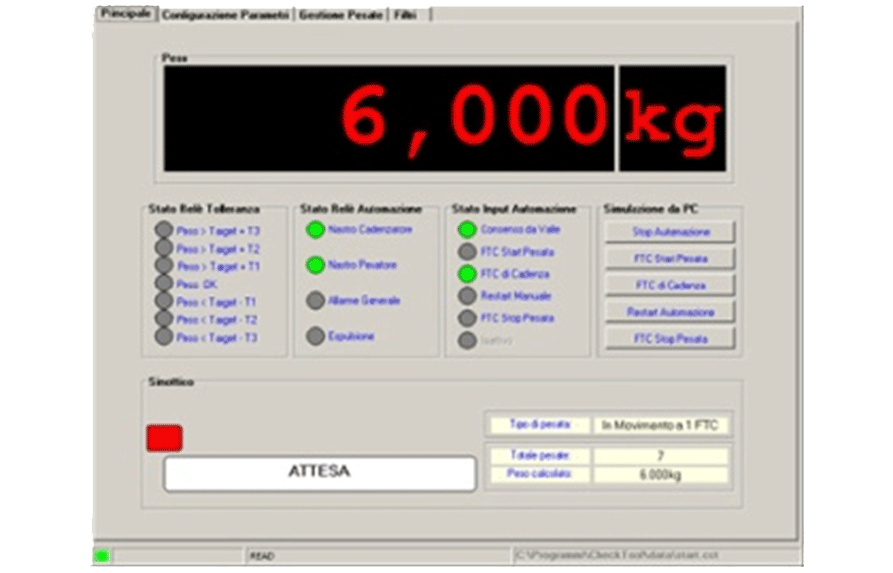 Programming software which allows to optimise the weighing results.
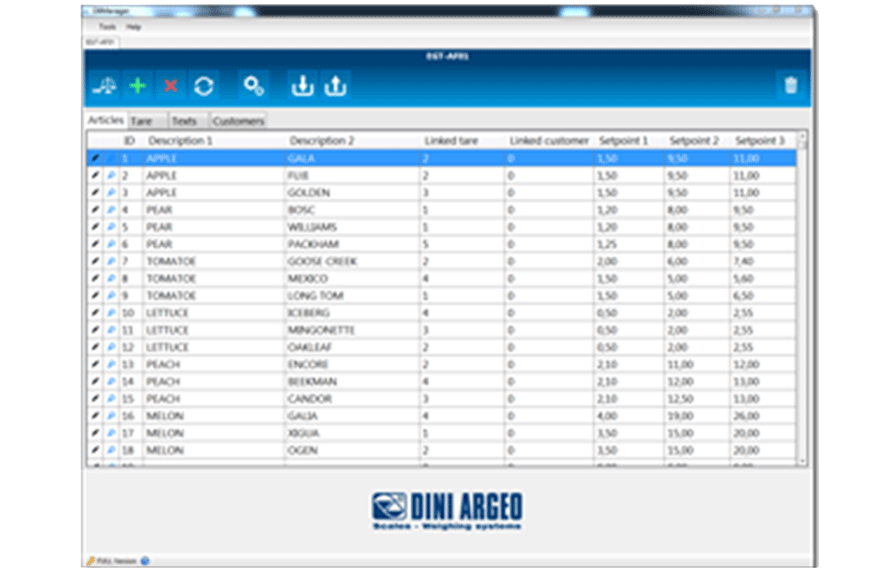 PC software which facilitates and speeds up the compiling of the scale’s databases, with the possibility to import/export them in a Excel format.
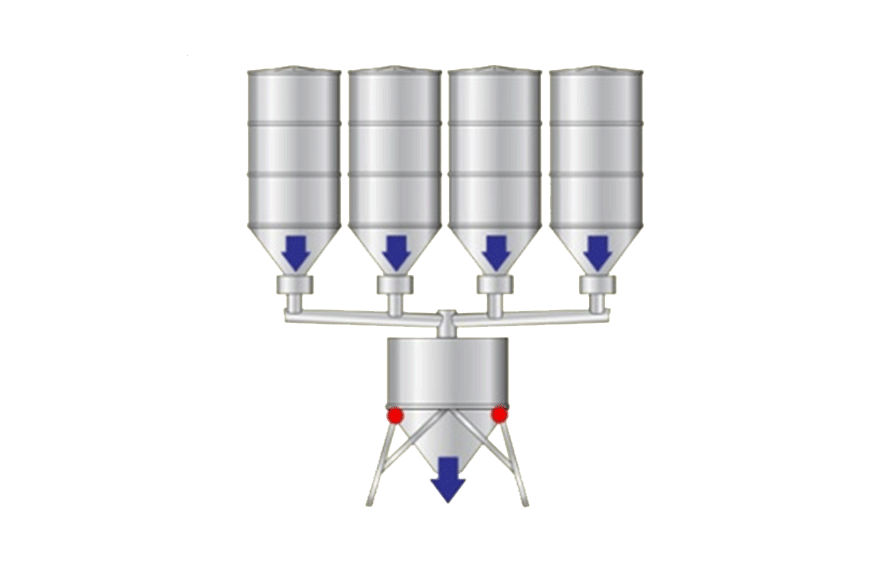 Configuration which allows the dosage of various products, in loading or unloading, as well as mixing and formulation, with the possibility of managing mixers, burners or vibrators using dedicated contacts.
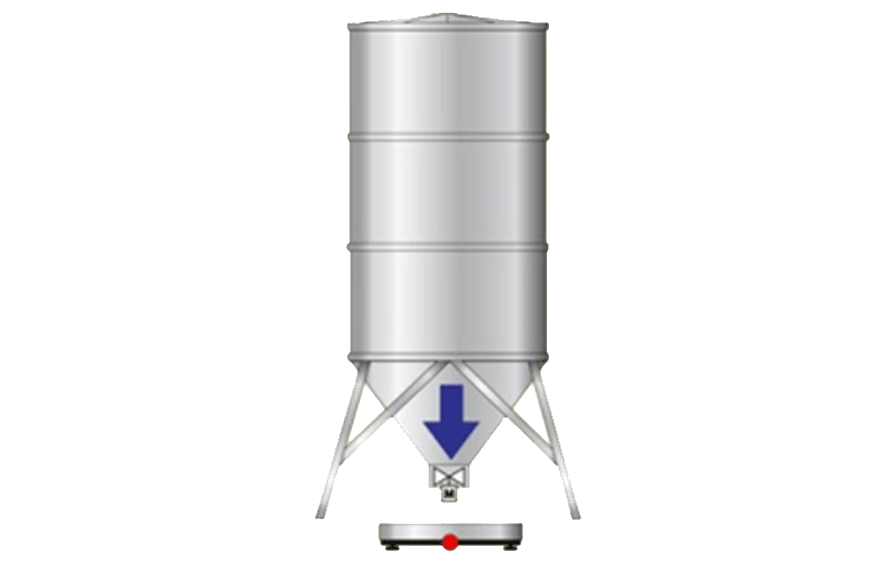 Configuration which allows to manage a dosage system in loading of a single product, useful for filling hoppers, silos or big bags, or guiding the operator in the manual dosages.
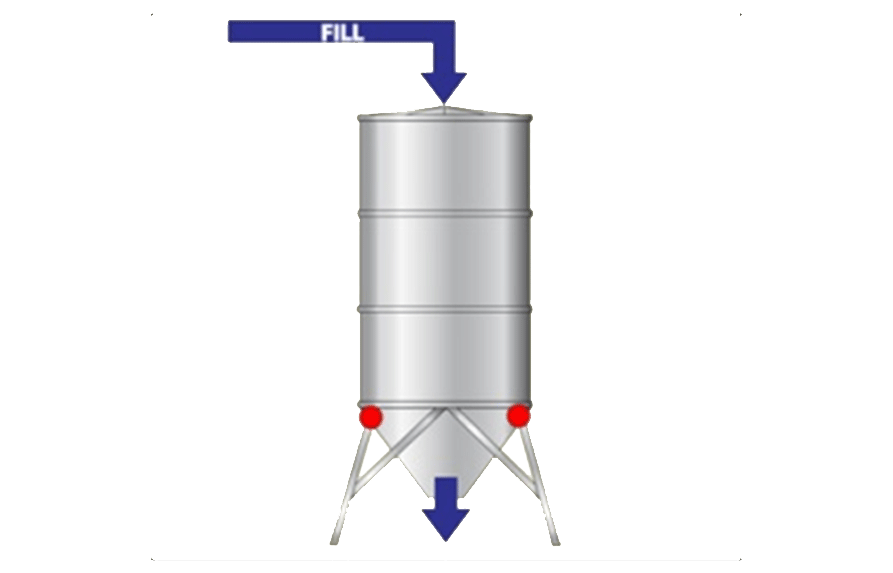 Configuration which allows to manage a dosage system in unloading of a single product, useful for dividing the quantity of materials of equal weight or extract precise quantities from the silo, with management of the reloading.
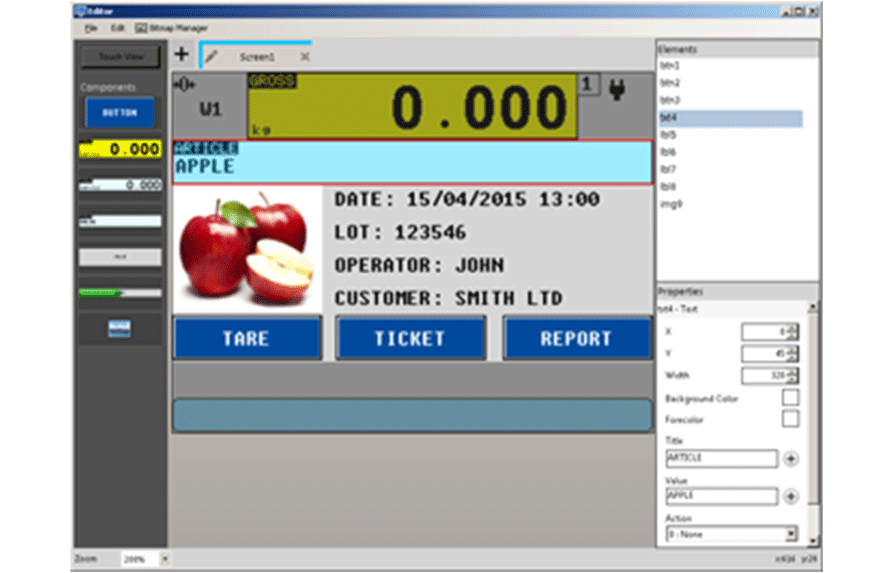 DINI DISPLAY TOOL allows you to quickly customize the interface of the indicator with touch screen, of the 3590ET and 3590EGT range.
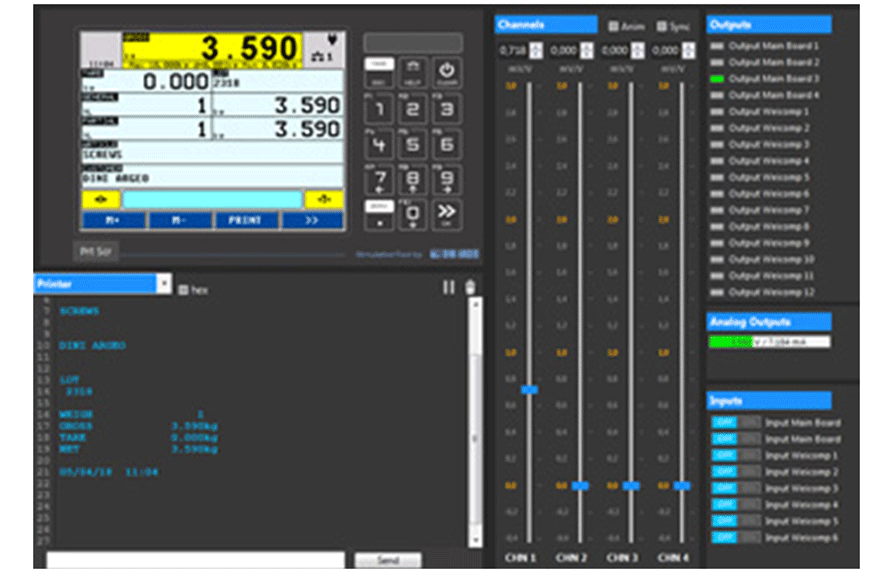 Simulation program to run the application software of the 3590 Touch Screen indicators on your PC. Ideal for testing and discovering, comfortably from your PC, all the features and innovations offered by each version of the desired application program.
 AF01
AF01 AF02
AF02 AF03
AF03 AF04
AF04 AF05
AF05 AF08
AF08 AF09
AF09 BATCH1
 BATCH
BATCH CHECK
CHECK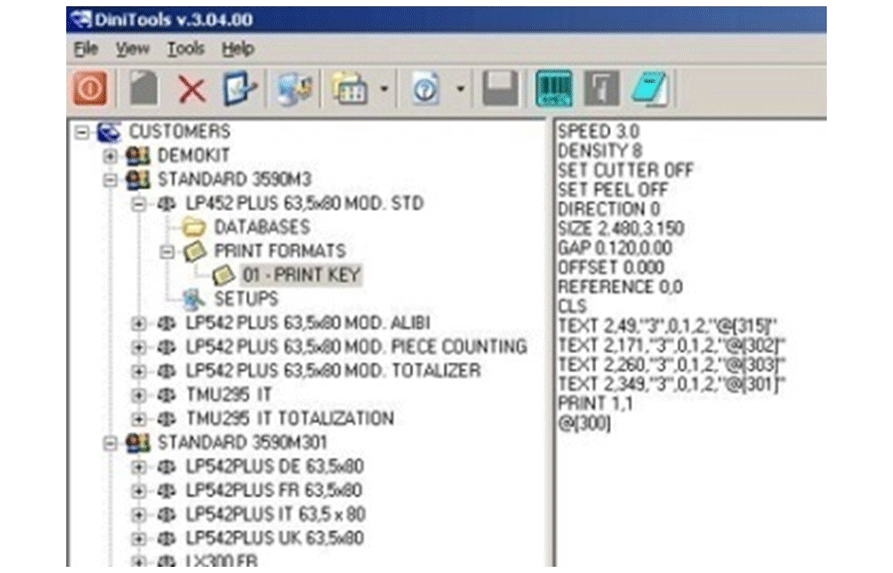 Package (FREE IF DOWNLOADED FROM THE INTERNET) which allows to easily programme and manage the DFW, TRI, TRS, CPW, 3590, DGT, DGTQ, DGT60 series’ indicators.
 Software version for the measurement/integration of the weight, the flow of material exiting from silos, tanks, or hoppers, with memorisation of the quantity of dosed material; possibility of adjusting the flow through the 16 bit analogue output and the PID control. Possibility of remote management of the instrument through Sysway or Modbus RTU protocols, as well as Profibus through external optional interface.
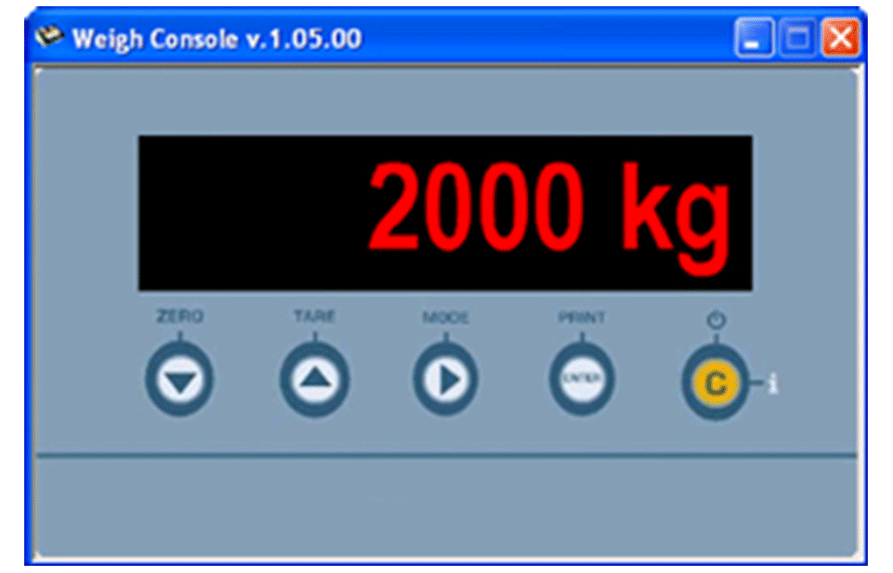 FREE software (if downloaded from the Internet) which allows you to monitor from PC the weight displayed by the DFW, 3590, DGT, DGTQ, DGT60, CPW, TRS, TRI series’ weight indicators.
 Specific software for programming, controlling and saving weighing data directly on your PC. Weighvault® is ideal to monitor the weighing operations and productivity of your CW90X scales.
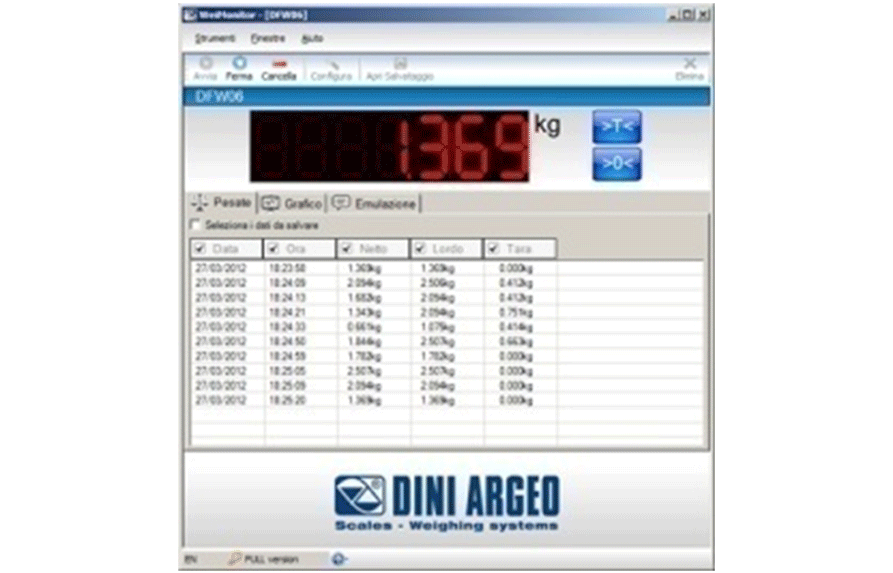 WeiMonitor is the PC program which allows you to monitor and record in real time all the weighings made on the connected scale, storing them in a text or Excel file for further processing.
 Software for a PC which allows to completely manage a weighbridge system, combinable to the DFW, DGT and 3590 series’ weight indicators. Besides the complete management of the connected scale, the programme offers a simple and intuitive operator interface, databases for the storage of the customer, material, and vehicle data, management of the totals and programmable printouts.
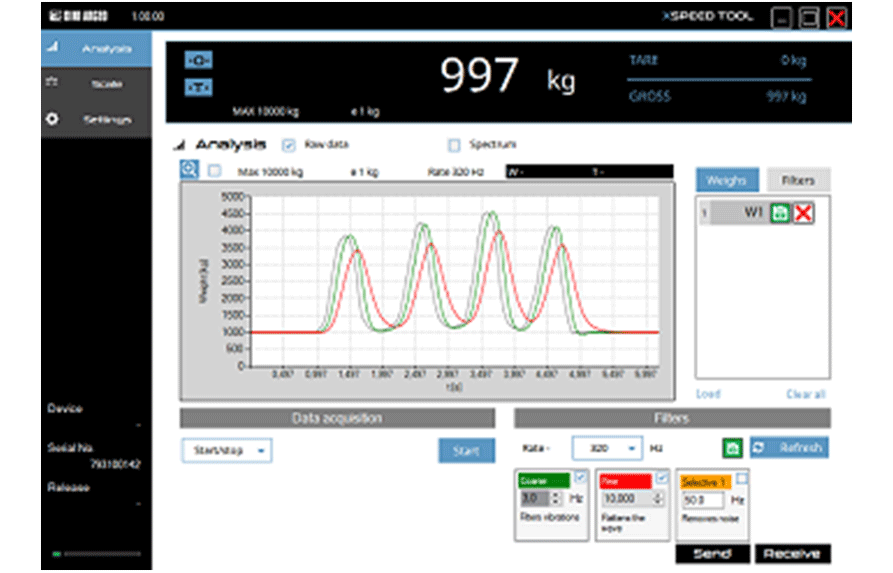 PC software that allows you to record the signal coming from the load cell in real time and process it by applying specific filters to remove vibrations, disturbance and noise.
 Suitable for advanced applications of weight totalization and formula weighing, with data, database and print management. CE-M approvable (OIML R-76 / EN 45501).
 Suitable for counting applications and data management, with articles database, clients database and tares database and customisation printouts. Internal Counting Resolution up to 1.500.000 points. Up to 5 independent connectable scales. CE-M approvable (OIML R-76 / EN 45501).
 Particularly suitable for vehicle weighing and weighbridge management, with input/output control of goods. The AF03 version allows to weigh the vehicle by itself or with the trailer, either with the operator as well as self-service with the badge reader, as well as the advanced management of the data and the printouts. The AF03 also offers the possibility of managing the main digital load cells available on the market. CE-M approvable (OIML R-76 / EN 45501).
 Specific program for 3590ET/3590EGT series weight indicators with touch screen display, it offers every main function required in the collection of data when weighing vehicles with weighbridges, either in manual mode with operator or automatic/self-service. The program can also be completely customised at the request of customers.
 Suitable for advanced statistical checking applications of prepacked goods with data and print management (as provided for by the directive N. 76/211/EEC). Up to 5 independents connectable scales. CE-M approvable (OIML R-76 / EN 45501).
 Specific software for production checking which includes all the main check functions, either in sample statistic mode or in complete statistic mode (as provided for by the directive N. 76/211/EEC). The touch screen interface shows in real time, every statistical data field with a chart or a numerical form. The simultaneous production lines check function allows up to 10 contemporaneous different articles check. CE-M approvable (OIML R-76 / EN 45501).
 Advanced price computing function with an evolved article management allowing to indicate on the label important information regarding traceability, through the most requested codifications (EAN13, EAN128 bar codes, etc.). The flexibility of configuration together with the large memory storage space, allows to satisfy the most diverse requirements of use. Particularly suitable for the foodstuff industry. CE-M approvable (OIML R-76 / EN 45501).